Showing posts with label Eng866. Show all posts

Thursday, May 3, 2012

Final New Media Project

For the end of this semester's New Media Theory and Practice class we had to create an final individual project using some form of new media.  The project asked specifically that we demonstrate a blend of theory and practice with an eye toward production.

Despite what I wrote about in terms of intention in my last post, I opted to focus on developing an interactive wall space during the space of my course project because it asked me to use programming elements that were furthest from my comfort zone.  I originally planned to do this piece using Adobe Flash, but elected not to since it is likely a dying cause.  So I opted instead for HTML5 and Javascript, with a touch of CSS for page formatting.  This portion of the project required the most learning, while the other elements of this project employ skill sets that I am already mostly comfortable with (Photoshop, basic HTML and CSS).  I feel that those portions of the project will be time consuming, but do not reflect new skill development necessarily, which is what I wanted to showcase for this New Media project.

In the end, I created this (mouse click to draw):

Error: Embedded data could not be displayed.

What’s most fun about this project is that it really is an opportunity for me to bring to life some of the theory from this class and put it into practice.  While the product thus far doesn’t necessarily capture the theories that were motivating me with project, the overall rhetorical situation that I’m consider does.  Throughout this term I had three terms that captured my interest most, which I kept coming back to as I thought through material for class:  interactivity, archive and persistence.

While I did develop a product that is a interactive drawing space, I did so by modifying rather than writing a Javascript file from scratch.  In the future, I want to get to where I can write that Javascript file from scratch like I can an HTML file, but I know that will come in due time.  I’m looking forwarding to spending the summer playing with more Javascript.  Through this project I’ve been able to discern the real power that Javascript has to enhance web development.  It has helped me to see just a bit of what I can really do and that makes me more excited.  I am happy to have a specific project to work toward because that will motivate me to learn.  I can’t see myself sitting through Javascript workshops or watching videos, because I never went that route for HTML, but I can see myself Googling and trying things out.  I know I’ll keep failing with this program and banging my head on the wall trying to figure out how to get something done.  BUT!  I now have a virtual wall to bang on and that rocks!

For a more detailed look at this production process, see my end of class reflection.

Monday, April 16, 2012

Update on My Final Project for New Media Theory and Practice


For my project this semester in New Media Theory and Practice, I‘m going build a Slash Page for my digital portfolio.  This site will serve as a virtual introduction to my scholarship, my pedagogy and me.  It will both visually and verbally convey my interests.  This site will take the place of my current professional site, which I don’t think truly captures who I am or my research effectively. 

This splash page will be built using Photoshop and XHTML/CSS.  I will use Photoshop to design/edit the images of each of the components on the page.  Then I will use XHTML and CSS to put them together in a web space, animate them and make them into links into sub-pages.  In addition to this overall framework, I have one portion of this splash page that I want to make interactive.  To make this interactive component, I originally was going to use a simple Flash program, but after talking to Shelley Rodrigo, I agreed to take the challenge and develop it in HTML5.  I am not a fan of Flash because of its incompatibility with iOS, but I felt more comfortable learning a simple Flash program because I feel like I have a basic sense of how Flash works.  However, Shelley encouraged me to get out of my comfort zone and invest in the technology that is up-and-coming, rather than the one that may be seeing its endpoint coming soon.

The first thing I did to work through this project was to spend some time sketching and talking through what I wanted it to look like.  I have had a murky mental picture of this thing, but I needed to talk through what it would really look like.  To do that I spent some time with some giant paper, colored pencils and my husband, just sketching and scrapping ideas.  From there I was able to get a picture of the components I need for the project.  Next stop—building!

Here are the components I’m thinking through:

The Slash Page:
· Side of a building with a street light next to it.  
· Building covered with various bits of graffiti and posters
· Center of the building, a door covered in stickers
· On the ground are a series of spray bottles, some lying on their side, some upright
· The bits on the wall include:
o Graffiti Lettering:  TEACH.
o A series of the same poster—done 1990s punk rock poster style that say something about Research on them  (Above them a sign “Post No Bills”)
o A wheat paste image of a Twitter Bird
o Some play on a poster that has a picture of me and “tear off” contact slips.
o My name is stenciled somewhere on the wall.
The Action:
· Hovering over each item makes it animate and enlarge.  The viewer can then click on it to enter the page:
o Door – “Enters” into a bio page with links to the other parts of the page (for viewers who want an hierarchical, linear experience)
o Street light –to my blog “Cicero’s Lightbulb”
o Graffiti Lettering:  Leads to a page on my teaching
o Wheat paste – leads to a page with my Twitter feed
o Poster series –leads to a page on my research
o Wanted poster – leads to my CV, unless you click on the “tear off strips” which lead to Contact me.

The Big Challenge:
Clicking on the spray bottles will take the viewer to a new page where the same wall from the splash page is now blank.  Clicking on the wall will allow them to “tag” it.  This will be accomplished through HTML5...once I figure out how. 

Subpages:
Once the splash page is created, I’ll create the contents to have a seamless visual identity.  This will require making Twitter and Blogger themes using CSS that continue the display from the other pages of the website.  It will also require revising my current personal website material (and CV) to continue the street art them that the other parts of the page will have.  These content pages will likely not be completed by the end of the Individual Project in English 866, but I will continue working on developing them for the Digital Portfolio project for the Foreign Language requirement of my degree.  

On Multimodal Online Journals


Over the last few weeks in New Media Theory and Practice we’ve taken some time to review a variety of online journals that allow scholars to present their research through multi-modal avenues or present research that explores multimodal texts.  We’ve examined Technoculture, C&C OnlineCCC Online, Kairos, Enculturation, and Flow.  Each of these journals has a slightly different scope, purpose and audience, but they all have this common thread in the way they value multimodality. 

As I looked at these, I was particularly interested in observing interface decisions and design choices.  While the field has had decades to establish good design choices for print journals, it’s clear to me that we’re still developing this genre for the digital world. 

One interesting observation I had while I was looking at each of these was the dominance of blue in the design.  With the exception of Technoculture, all of these journals use blue as a dominant design color (though Enculturation’s might be said to be a bit more purple than blue).  Having noticed this pattern I started to wonder why this coincidence occurred.  This led me to an article on a site called Web Design Ledger called “55 Beautifully Blue Web Designs toInspire You.”

The author of that post, Gisele Muller actually encourages design using the color blue because of the associations that go with it.  While the connotation of sky and sea that Muller references is one reason blue might be a good design choice, another reason might be accessibility. 

In an interview with Chandoo.org, Garr Reynolds, author of Presentation Zen talks about color choice and says, “You need to realize that lot of people are color blind, so it is safer to use shades of blue or gray than using lot of colors. There are really no hard and fast rules for colors” (Read the whole interview).

Thus, blue might be a go-to web design color because it’s more interesting than gray while retaining accessibility to those who are color blind.  Interesting stuff.

Screen Shot of Flow
Screen Shot of Flow
As I considered the design of these sites, I think I was most drawn to the ones that were simplistic and straight forward in design.  Flow, whose content I find most interesting because they welcome articles that are somewhere between journalistic and academic, was the least appealing to me as a navigator, though the page as a whole is not unattractive.  It was hard for me to prioritize my viewing experience because there was so much to choose from.  

Instead, I preferred Technoculture and Enculturation's interfaces.  
Screen Shot of Enculturation
Screen Shot of Technoculture
Screen Shot of Technoculture
I had a slight preference for the latter because all of its navigational options were on one side, rather than on both left and right of the main column of the page.  As I think about these preferences, however, I cannot help but to assume that I have these preferences as a result of my book-biased cognition.  I think I am used to and comfortable with the linear consumption of knowledge.  Perhaps it is not that Flow has a problematic interface, but rather my mind is uncomfortable with the prospect of having to learn as a means to gain access to a document.  I wonder if the next generation will feel more comfortable in such interfaces and if my comfort will grow as these things become more commonplace?

Monday, April 9, 2012

Does Remixing Like Tarantino Keeps Us Human?

Throughout this semester in New Media Theory and Practice, I’ve been looking for definitions of media and new media to latch onto. Honestly, I’ve always found “new media” in particular to be a slippery term to hang onto. I found in Flusser’s Does Writing Have a Future, however, a definition that I really am drawn to. He defines media broadly when he says that media are “bridges supported as much by the receiver's as by the sender's pylon” (Kindle Location 550). In this way media is given a broad definition that encompasses all types of communication. Media is the tool that facilitates the delivery of the pylon, whatever that might look like in a given context.

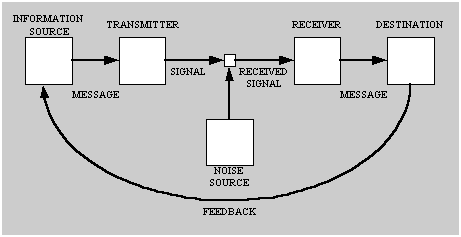
 This definition isn’t really revolutionary, but I appreciate the concreteness of it.  It gives me another picture of the classic sender - receiver model, which is pictured below, but one wherein the Transmitter, Signal, Noise and Receiver are all quantified as being the work of the media.
Sender - Receiver Model Diagram that shows Information flow from Source to destination
Source:  Wiki of Science

One thing that’s struck me as I’ve been working through this book is that I typically think of expressing content through visual means as a form of new media communication. However, one thing that Flusser’s book points out to us is that this kind of communication isn’t new to the digital age. He says, “As the alphabet originally advanced against pictograms, digital codes today advance against letters to overtake them” (Kindle Location 1628). This reminder helps me to think about how a lot of technological revolutions are really a matter of remixing older artifacts.

What’s important about this observation is the humanity that Flusser sees in thoughtful remixing. He says, “We fear that in the future, all messages, especially models of perception and experience, will be taken in uncritically, that the informatic revolution could turn people into receivers who remix messages uncritically, that is, into robots. (Kindle Location 935). Like with the text of How We Became PostHuman, Flusser keeps returning to the cybernetic fear that we face if we change the way we code and recode information. However, he indicates that one characteristic that ensures us our humanity is this notion of critical remixing. In many ways, I think our clever use of remixing is what, even more than the empathy from Do Androids Dream of Electirc Sheep, makes us unique from the beast and robots of our society. In fact, I think many of the great thinkers of the contemporary age stand out to me as genius because of the way the can use remixing.

For me, there’s no greater example of this than my personal favorite: Quentin Tarantino.

This video, part of Kirby Ferguson’s Everything is a Remix Series, shows the beauty and detail through which Tranatino remixes to create Kill Bill.


As I think about remixing, I’m not hopeful that the robots of today or the near future will be able to remix in this way.  But it does make me wonder:  what would machines need to accomplish this task? What is it that makes humans skilled remixers?


Reference:

Flusser, Vilem. Does Writing Have a FutureMinneapolis: University of Minnesota Press, 2011. Kindle Edition.

Monday, April 2, 2012

Writing Sucks the Life Out of Us


So I hate vampires.  It’s a thing.  No—really.  I don’t watch movies with vampires in them, not even if they sparkle.  Especially not when they sparkle.  Actually—I’ve only ever liked one vampire in this lifetime.  The Count.  Featured in his glory in the video below:


Actually, I suppose if you count Count Blah from Greg The Bunny, perhaps I like two vampires....Nevertheless..

So, I was quite surprised to find vampires show up in Flusser’s Does Writing Have a Future.  But they’re in there.  And…apparently…they are in this blog too.  Turns out, they’re everywhere.

Flusser says, “In their battle against the spoken language, characters of the alphabet (which are basically nothing but dead letters, invented to spin the magical promise of myth out into lines) suck the life of the language up into themselves:  letters are vampires" (Kindle Location 542). 

Letters—these trusted friends I’ve had my whole life.  Vampires?  Yikes.  Apparently the Count wasn’t the only Vampire featured on the average episode of Sesame Street.

As much as I hate vampires, I really dig this metaphor.  It creates this image of the alphabet drawing strength only from its ability to tap into the life of live language. It shows us that the alphabet that we so put our trust in is nothing without the life force of language that we breathe into it when we write.  I like it.

Vampire written upside-down with red on the tops of the M's to resemble bloody fangs
Image Source:  Awesomenator
What’s more, Flusser metaphor of vampiric letters also explains the taxing nature that the writer goes through when he or she takes to the task of writing.  He claims:

“The writer presses the letters, these dead marks, against the living body of the language so that they can suck life out, and lo and behold: these vampires take on an eventful life of their own under his fingers. No wonder he swoons, feeling his life energies have been spent” (Kindle Location 525). 

I think if we believe this metaphor to really capture the heart of what transpires when an author takes to writing then it helps to understand why writing can be such a painful process.  After all—those letters have to suck the life of language from some place.  That place, in the writer’s case, is from the writer his or herself. 

Reference:

Flusser, Vilem. Does Writing Have a FutureMinneapolis: University of Minnesota Press, 2011. Kindle Edition.

Monday, March 26, 2012

Not "What is Writing's Future", but "Does Writing Have A Future?"

Does Writing Have a Future Book Cover
Source:  Tower Books
Does it? What a provocative question. I often wonder what writing will look like in the future, but I never ask such a bold questions as whether or not it actually has a future. Of course it does, right? Or does it?

This question is the title of an extremely thought-provoking and “chewy” book by Vilem Flusser. I say “chewy” because it provides some really somewhat thick ideas that the reader is best served by moving through slowly and thoughtfully, ruminating on carefully. I’ve found doing so particularly rewarding.
This book strikes me as a must read because it addresses questions that are important for me as someone who defines herself as a compositionist most of the time, but a writing teacher at other moments. Being introduced to Flusser’s work is also important to me. According to the author of the forward, Mark Poster,
“Like both McLuhan and Baudrillard, Flusser theorized media culture well before many other cultural theorists thought seriously about it” (Kindle Location 45).

 Flusser’s ideas were well ahead of their time, but since he wrote in German, his ideas were not widely accessible to monolingual, English speaking scholars like myself.

The opening chapters of Does Writing Have a Future provide an introduction to the project of Flusser’s book and then begin to trace the history of writing. One thing that I really enjoyed from these opening chapters was the way in which Flusser was able to claim an already coined term for his own purpose. He takes the word superscript and opts to use it to describe the meta-writing he’s doing in his work. He says,
“Thinking and writing about writing should really be called superscript. Regrettably, that word is already in use and means something else. But it doesn't matter: with permission, the word superscript will be used with the new meaning suggested. Aren't there people who would call such violence against language ‘creative’?” (Kindle Location 245).
I love this notion of repurposing language, but I wonder why he wouldn’t have been comfortable with metascript.

Having established his task in the book as being superscript, that is the writing about writing. He begins to outline what he feels writing does for the world. Flusser argues that historical consciousness was not possible before writing. In fact, he argues there nothing happened before writing. Bold right? He says:
“It is therefore an error to suppose that there has always been history because things have always happened, to suppose that writing only recorded what had happened, to regard historical time as that period in history when people recorded events in writing. It is an error because before writing was invented, nothing happened; rather things merely occurred. For something to happen, it has to be noticed and conceived as an event (process) by some consciousness” (Kindle Location 270).
From statements like this one I began to really dig the writing of Flusser. I find his propensity for language really captivating. He achieves quite a bit through playing with the nuances of language. Nothing happened; things merely occurred. He argues that writing makes this happens. Part of the reason for this is because writing forces the spirit of an event into some form of permanency. To demonstrate this, Flusser traces the history of writing beginning with its roots in Greek and Latin. He shows how writing, entomologically speaking means to scratch or dig. Early writing was not a matter of writing on something, but rather in something.

This short video from PBS gives nice evidence of this fact. It traces the history of writing to its roots and provides examples of early writing. You notice from watching this video that writing was originally about digging into a tablet using a stylus, not writing on a surface.

Watch History of Writing on PBS. See more from History Detectives.

This observation about the history of writing is important for Flusser because he describes how writing as inscription is tied to stories about the forming of humanity itself.  First he reminds us that the term writing is linked to both the ideas of both scratching, as we think of when looking at the work a stylus does, but also tearing.  Then, he describes the narrative of the creation of human kind.  He says,
"God forms his likeness on clay to bury his breath in this likeness. God inscribed not amorphous clay but an image. He wrote not against the given (the datum "clay") but against something made (the image "God")-against a fact, that is [...]  According to the myth, God tore his likeness apart (no matter whether we take this likeness to be an anthropomorphic doll or a tablet) and, in so doing, wrote us" (Kindle Location 320 and 337).
With this narrative in mind,  he argues that what we lose by abandoning writing is the connection to narratives such as this one:
"What will we give up when we replace written codes with other, more efficient ones? Surely all those anthropologies rooted directly or indirectly in the myth under discussion here" (Kindle Location 337).
This evolution just makes me wonder if we will abandon such anthropologies or simply rewrite new ones.  I wonder if this metaphor of writing is really central to this creation story or whether we might write new ones that appropriate new media technologies.

Besides--as a believer in the Biblical creation story, I cannot say that understanding the metaphor of God writing us into existence was really necessary to my understanding of creation, since I never thought of it in that manner before reading Flusser's account.  This new understanding of the creation story does give me something to play with mentally, however, as someone of faith who specializes in writing.  I am personally very interested in looking at concepts of theology and their relationship to writing and words.  I get caught up in the meaning of John 1:1, for example, far too often.  However, that's a story for another day.  I'll blog about that later next month after I get my logos tattoo.  ;)  Stay tuned!


Reference:

Flusser, Vilem. Does Writing Have a FutureMinneapolis: University of Minnesota Press, 2011. Kindle Edition.

Monday, March 19, 2012

Rails 1. Cheri 0...or maybe 0.5.


Continuing to Do Very Little with Ruby on Rails

After setting up the first application in Rubly on Rails (see my last post on my Ruby progress), the tutorial I was following walked me through the steps of signing up for GitHub and then Heroku and connecting the first application to these services.  

GitHub is a tool that serves as version control. What's cool about version control is that when you accidentally mess up your code, which for me isn't so much of an issue of "if" but rather "when," you have a safety net.  You can revert back to the last committed code on GitHub and pretend you didn't accidentally just mess up your application!  Nice!  It took me a long time to get my application synced up with GitHub.  Signing up for GitHub itself was easy enough, but then I had to connect my local files to the GitHub account.  To make this work, I had to learn about SSH key first, learn where to find mine and how to connect my GitHub account up with it.  Of course, really what I did was skip over the line in the tutorial book that said, after saying you should sign up for a GitHub account "You might have to read about SSH keys first" (Kindle Location 808).  Because I skipped over this, I spent about an hour banging my head on a wall when my application wouldn't connect up with my GitHub account.  Note to self:  pay attention to stuff in the parentheses!   

Nevertheless, I got to see my "first_app" files all safely hosted at GitHub, as this Screen cap shows:
GitHub Screen cap showing first_app files
  

Heroku gives your application a place on the web to live so that you can deploy it.  It's really a simple tool to use, once you know what you're doing with Terminal and GitBash.  You sign up for a Heroku account, then you gem install Heroku, tell Heroku your SSH keys and then use Git to push the application to the repository.  The image below show's the start of that--and how if you misspell things it will give you an error.  HA
Screen cap of Heroku install and SSH set up

Fair enough.  The push process was incredibly slow, especially on Panera's wifi ;).  Here's a Screen cap of the progress after about 10 minutes--that's right, 5% written.  
Screen cap of push to Heroku, 5% written

After I let the push run the first time, I got an error message that said:

error:  failed to push some refs to 'git@heroku.com:young-mountain-1502.git'

Bummer.  So I did some research on this and found that some folks had success using some tricks with the git remote command to work around it.  No dice.  I end with this:
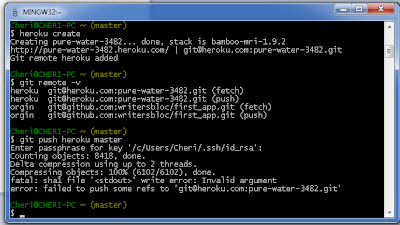
Screen cap showing failure to push to Heroku again.

All this did is help me to create a new respository name (pure water rather than young mountain) to fail at syncing with my account.  I still have not been able to figure out what my hang up is here.  I've searched the forums, but haven't quite found a solution yet.  I'll have to keep digging.  The trouble with working with GitBash and Terminal in general is that there seem to be so many things that can go wrong.  My understanding of these processes is just enough to be dangerous, but not deep enough to know what I need to solve problems.  It's frustrating, but it gives me renewed appreciation to the depth of knowledge that developers have for this stuff.  I admit defeat.  For now.  

End of Tutorial Time Reflection:  So how far have I come?
Alas!  I have made it through Chapter 1 of Ruby on Rails 3 Tutorial: Learning Rails by Example, give or take the successful push to Heroku.  As the author, Michael Hartl, says in the conclusion of Chapter 1:  "We've come a long way in this chapter:  installation, development environment set up, version control and deployment" (Kindle Location 958).  It's true that I have come a long way and accomplished a number of things, but it really doesn't feel like progress because so much of the progress has been mental and in problem solving rather than visible.  

I have gained quite a bit in terms of understanding what goes on below the surface of development.  I have learned a wide variety of commands in terminal, I have learned to work in GitBash, and I've become familiar with tools for version control and hosting applications.  I learned about SSH keys, which previously I had no idea existed.  Now that I've worked through all of this, there's only one thing left to do.  As Hartl says at the end of Chapter one:   "All that's left is to,  you know, actually start learning Rails"  (Kindle Location 960).  

Yikes.  So I learned the foundation that I was missing, and not realizing I was missing, so that I can begin web development using Rails.  I learned how much there is to know and how much I really don't know.  What I would like to do now is slow down, back up and start moving through this again.  I need to spend some more time researching Git commands and getting to know not only what the commands are, but what those things actually do.  I need to learn more about Gems and how they really work within the greater framework of Ruby and Ruby on Rails.  What do they do?  Once I get some foundation under me, then I can start really playing in Rails.  But, alas, I really needed to learn to crawl before I started trying to jog.  Or Joggle, which might be a better description of what I was trying to accomplish.  

In the future, I still would like to develop a web application from the ground up, but I've got quite a bit of growing to do first.  That--and I need to find myself some Rails nerds to hang out with.  The forums are useful, but they only go so far.

Reference

Hartl, Michael Ruby on Rails 3 Tutorial: Learn Rails by Example. Pearson Education, 2010.  Kindle Edition.


Friday, March 16, 2012

Considering Examples of Ruby on Rails

As I’m beginning to play with Ruby on Rails, I’ve also begun to think about web tools that are currently running on Rails and what they are capable of. The Ruby on Rails website gives an extensive list of sites that use Rails: http://rubyonrails.org/applications.

First, I found it hard to determine which sites were using Ruby on Rails, because, since I’m not a developer, it wasn’t clear to me how to look for those signs! I’m used to viewing the source of a page to look for makers that it was built with CSS or to look at how it’s used HTML, but nothing that tells me what’s going on behind the scenes at a deeper level. I found this handy site, called Built With, however, which helped me mine quite a bit of information about any website I wanted to know about!

From Built With, I saw that use of Rails has been fairly consist over the last year, with not too much substantial growth.

Graph of Ruby on Rails usage of the last year, showing minimal growth
Source:  Built With
While I had heard that Twitter was built with Rails, Built With did not indicate that, so I looked into Twitter’s development further and found that they’ve been slowly moving away from rails over the years. However, other big name sites like Github and Groupon continue to use the resource. From Built With, I learned that the platform is largely used for shopping and business resources.

Graph of Ruby on Rails usage by industry; Shopping and Business have greatest precentages
Source:  Built With
One thing that I’ve found in examining these sites and researching their usage of Rails is rails is powerful, but also subject to certain vulnerabilities. Let’s start by thinking about their power. Rails sites are powerful. They are able to handle robust amounts of information and able to customize what information is delivered to a user based upon specific parameters they establish. For example, Groupon allows users to specify the geographical location and then the content is customized based upon deals available to that region and based upon the temporal availability of the individual deals. Rails helps facilitate this process of selecting data to display based upon parameters. Twitter is similar in that it selects tweets to display based upon what each user has specified in terms of whom (or what) they wish to follow.

Unfortunately, however, Github was recently the victim of a some pretty serious hacking that was the result of exploiting one of Ruby’s vulnerabilities: mass assignment vulnerability. Now, I don’t really know what that entails fully, but I know that it allowed the hacker quite a bit of access to files wherein he could have done some serious damage. Luckily for Github, the hacker seemed to be mostly trying to prove a point about the vulnerability, rather than do something malicious (More on that from Ars technica). However, it seems like to protect your site’s material best, you really need some intense understanding of Ruby programming in a way that I just don’t have yet.

As I think about what these sites are used for and what they accomplish, I cannot help but wonder whether Ruby on Rails is really a useful tool for me to explore for the purpose of making a personal portfolio site. It would be a powerful blogging platform, for sure, which would allow me all the customization I could possible imagine. But is the flexibility it affords really worth the trouble of learning the development process? Would I not be better off learning to customize a blog platform in a far deeper manner, including developing and modifying my own themes. I’m not sure, but I think I need to further explore whether I am learning this tool to be able to say I know it, or whether I’m doing so in a purposeful way. I am really one that is cautious of adopting technology for technology’s sake, so this is really food for thought indeed.

Rails on *shudders* Windows...


Okay—so after I nearly killed my computer, I decided to be safe and play with Ruby and Ruby on Rails by booting up the side of my harddrive I rarely use—the Windows side.  My initial plan was to clear out that side and install Linux to play with Ruby and Ruby on Rails, but I decided just for giggles to try out installing Ruby 1.9.3 with Windows.  It is with great pain that this Apple-lovin’ gal says:  it was so much easier. 

With Windows, you have the option of using Ruby Installer  This page makes the installation of Ruby almost dreamlike.  You simply click on the big “Download” button and it downloads an executable program.  You run it.  Magic happens.  Now—I’m not ready to give up on my Mac and go running as a proponent for Windows, but this is a nice solution to help me continue on my Ruby on Rails tutorials for my New Media Theory and Practice class.  I’ll figure out how to get this happening on Lion this summer.  I will not be defeated!

Once I got Ruby 1.9.3 up and running on my Windows side, the installation of Ruby on Rails was pretty smooth.  I just had to take one pit stop to install Ruby Gems, which is a project manager for Ruby.  Using Ruby Gems, I was able to install Ruby on Rails with a simple Ruby Gems command.  From there I was finally able to move along to my first Rails application!

The only real trip up I ran into through this process was having to remember to change drives with in the terminal to where I had things saved.  This screen cap (below--click to view a larger version) shows two places where I got an error because I needed to change the drive my computer was looking for files in—first where I had the installer saved and then where I had my first application saved.   

Screencap of Terminal wherein drive changes were needed twice.

I should note that at this point I started moving through Ruby on Rails 3 Tutorial:  Learning Rails by Example once I moved to the Windows side.  Within no time working through the tutorial from that book, I finally had a product of sorts to show for it.  I was able to create my first Rails application and then visit it on my local host.  Below is a screenshot of what I was able to produce. 

Screencap of My First App with Ruby On Rails
Screencap of My First App with Ruby On Rails (Click to view larger)

[Sidenote:  Yes, that second tab in this picture is from my Google search for how to do a screen cap when running Windows on a Mac.  The normal Mac command didn’t work and there is no print screen button on the Mac keyboard!]

Now, technically I did very little, but I think the fact that I was able to produce this preformed site so quickly speaks to the power that Ruby on Rails has for web development.   I’m looking forward to playing with these further so I can see just how far I can get with building a page from fake-scratch with the help of the tools Ruby on Rails provides.

Monday, February 27, 2012

How Sci-Fi Loves to Fear the UnHuman

One of the things I really enjoyed about reading How We Became Posthuman was its connection to literary texts—specifically science fiction ones. When I was an undergrad I took every sci-fi related class I could get my hands out. Somehow, as I moved into graduate school I moved away sci-fi and eventually away from reading very much literature at all. Still—books, films or otherwise, I’m always drawn to sci-fi. Seeing how Hayles uses science fiction in How We Became Posthuman helped me to understand why I’m drawn to this genre in some ways.

I think it has much to do with the way in which the genre of sci-fi often plays with humanity’s fear of becoming unhuman. So many essential sci-fi texts (novels, comics and also films) deal with this fear.


Source (all images): IMDB


These are just three examples that pop into my mind first. It seems Will Smith has even made a career in fictitious battles against the unhuman. However, what Hayles shows us is that no matter how much fear (or cybernetic anxiety) we have about technology leading us to a place where we cannot tell human from machine, the “toasters” are already amongst us. 

She says, “Cyborgs actually exist. About 10 percent of the current U.S. population are estimated to be cyborgs in the technical sense, including people with electronic pacemakers, artificial joints, drug-implant systems, implanted corneal lenses, and artificial skin. A much higher percentage participates in occupations that make them into metaphoric cyborgs, including the computer keyboarder joined in a cybernetic circuit with the screen, the neurosurgeon guided by fiber-optic microscopy during an operation, and the adolescent game player in the local video-game arcade” (Kindle Location 2503). 

Hayles goes on to introduce a term called “terminal identity.” She explains,  “Scott Bukatman has named this condition, calling it an ‘unmistakably doubled articulation’ that signals the end of traditional concepts of identity even as it points toward the cybernetic loop that generates a new kind of subjectivity” (Kindle Location 2503). As it turns out, Bakatman hasn’t simply coined this term, but he wrote to book on it. It seems that this book, which takes the term’s name, Terminal Identity, attempts to redefine what human identity looks like in the age of new media. 

I think what’s unique about how Hayles and Bukatman approach the post-human identity and the way that the sci-fi genre typically does is that in sci-fi these identities are always the root of the horror of the film. The unhuman is the bad guy; the human saves the day. Maybe it’s even because of some element of humanity that the human is able to save the day. Hayles acknowledges the fear of the unhman, but she also suggests that the dreadful versions aren’t all there is to consider or all that is possible. She says, "Although some current versions of the posthuman point toward the antihuman and the apocalyptic, we can craft others that will be conducive to the long-range survival of humans and of the other life-forms, biological and artificial, with whom we share the planet and ourselves" (Kindle Location 6057). 

In the end, I think How We Became Posthuman helped me reconsider what I thought it meant be cyborg or posthuman. You don’t have to be the Terminator to be posthuman. It helped me realize that posthuman is not really something to fear but to recognize is already happening. What it means to be human in our world of smartphones is not what it meant to be human in the 1980s when no one I knew had a computer in their home. Yes, we will have to negotiate it in the same way we negotiate other societal changes, but it’s not something we have to assume will be bad. Still--perhaps our sci-fi texts keep us safe in some ways by keeping the fear alive so that we think carefully about what it means for our iPhone to become an extension of ourselves.

Installing Ruby 1.9.3...or How to Kill your Computer Quickly


The beginning of my experience with Ruby on Rails was, in all honesty, really pretty frustrating.  Initially I spent some time using websites Ruby in 20 Minutes  and Try Ruby to get the basic feel for Ruby.  Through these I learned some basic commands and how the coding works to assign meaning to objects and to recall them.  I learned enough to get dangerous, knowing I could return to the forums and wealth of sites on the interwebs when I need more help teasing out how to make the code do what I want once I had something to work on.  I find that I get really impatient learning code for it’s own sake—I want something to play with.

Naturally then, since I wanted to work on Ruby on Rails, I moved along to getting Ruby on Rails installed on my computer.   This process took me an embarrassing amount of time.  It all started with installing the most recent version of Ruby.  I’m a Mac user, so Ruby 1.8.7 comes preinstalled on my machine.  To run Ruby on Rails, however, I needed at least 1.9.  The latest version is 1.9.3.  To do this install, I relied upon terminal and a number of really thorough websites and forums with advice on troubleshooting this install process.

Basically, I started by installing Ruby Version Manager (RVM), then I checked for the requirements for running RVM ($ rvm requirements).  When I did this I got the error message below. 

Code for rvm requirements that ends with a warning about Xcode 4.2.
Screen Cap of RVM Requirements Error

This told me that when I ran the install command, I would need to amend the command with I ran the function again with –-with-gcc=clang.  So, learning that I made sure I had GCC and entered the following into the command line:  rvm install 1.9.3 –with-gcc=clang.  This asks that Ruby Version Manager install Ruby version 1.9.3 using GCC as the C language compiler.  Fancy stuff.

Screencap of rvm install 1.9.3 --with-gcc=clang that ends in a make error that calls for installation halt.
Screencap of "make" error
Sounds great.  But it didn’t work.  This time I got a “make” error.  I spent an inordinate amount of time researching this error and try a variety of things to try to fix them.  Finally, one shady sudo command (which is a command that allows the program administrative privileges)  caused me to not be able to run RVM commands at all.  Something was really odd about terminal at that point.  So I restarted my computer, only to get this error:

Macbook Pro with a fatal error on boot up
An iPhone photo of something that you don't want to see your Mac Do


This message ushered in a way of panic I care not to experience again any time soon.  After some research (and the research of my dear buddy, Mat Reynolds), I realized that I could reinstall Lion on my computer and it would probably fix the error.  So, I booted the computer using the Recovery HD and told it to reinstall Lion.  Everything was there, happy and fine, as it was before I started playing around in Terminal.  <sigh of relief />

So—lessons learned?

I learned quite a bit about the command line.  I learned the basics of Ruby, but also quite a bit about Terminal.  I learned what commands like bash and sudo do and the power the later has over the computer.  From this experience, I decided that in the future it might be better to work on playing around in terminal from the other side of my partitioned harddrive, so that I don’t mess of my REAL workspace.  About two years ago I (okay, my husband) partitioned my harddrive and installed windows on one half.  At the time I did this because the web conferencing software used in ODU’s distance PhD classes was Windows only and I refused to have a window’s machine in my house.  When my computer was failing to load on the Mac side, the Windows side could still load easily.  I decided from this that I should either wide the Windows side and install a second version of Lion on that side, or perhaps Linux, so that I could keep my files safe from my dangerous play.  

Monday, February 20, 2012

Let the Ruby on Rails Tutorials Begin!


Red Ruby on Red Rails
Source:  Iconspedia
During this semester, I’m taking some time to learn Ruby.  I am actually hoping to learn to play in Ruby on Rails in particular.  I decided to work with this web application developer which is based in the Ruby language for a few reasons.  As I’ve mentioned elsewhere in this blog, I have worked with HTML/XHTML and CSS in the past.  I feel like I have a pretty comfortable working knowledge of those.  I pretty much understand how webpages go from text files to the beautiful or terrifying (read:  PineSol) results we see in our Internet browsers.  Of course, my knowledge is mostly limited to building static websites.  I have a really limited knowledge of what goes into making dynamic webpages.   Ruby on Rails is a really powerful platform for creating dynamic webpages quickly and smoothly.  At least that’s what it seems to promise.  So that appeals to me.

The fact that it’s based in Ruby is also a draw.  One thing that’s always been a mystery to me is more “hardcore” programming.  I’ve never taught myself a C based language or worked with a programming that required that I hang out in Terminal.  So I wanted to take some time in the safe space of my New Media Theory and Practice class to play with learning this form of programming.  Right now we’re working on a project simply called “Individual Tutorials and Reflection” where we are tasked with people a language or development tool and spending time working through tutorials on it and reporting what we’ve learned.  I am learning the basics of Ruby and terminal commands as necessary to make a web application by using Ruby on Rails.  The tutorials I am following are mostly Ruby on Rails tutorials, but have been using Ruby and basic programming tutorials (or wiki pages) as I’ve worked to help me when I get stuck or run into an error the book I’m working through doesn’t explain.

Ruby on Rails really appeals to me because I am the kind of person that needs to see a product of his or her time.  I need to be able to play with something real.  So, I tried learning Ruby alone through just basic tutorials.  I found a few that were really quite user-friendly, in fact:
However, after I worked through a number of exercises in these sites, I found myself getting antsy.  I wanted a product beyond what was possible from the puts command.  So—off to Rails I went after having watched the video below and being amazed by what the creator, Davide Heinemeier Hansson could accomplish so quickly during his demo:


I am able to see the product of Rails tutorials more concretely by viewing how my changes effect the first application I’ve created (more on that in my next blog).  The tutorials I’m currently working through are from Ruby on Rails 3 Tutorial:  Learn Rails by Example.

What I hope to do in Rails is develop my own web space from the ground up.  As I’ve mentioned previously, I’m really something of a control freak.  I want to put together a site for my portfolio, but I want to be able to do so in a space that I have more control over than what many web development sites provide (Wordpress or GoogleSites for example).  In the meantime, I’m hoping what I learn through this exploration can next be transferred into a larger project for New Media Theory and Practice and then become the foundation for the New Media Application project that I will complete in place of the foreign language requirement for my degree.  

Monday, February 13, 2012

Taking the Humanity Test

Turing Text Extra Credit:  Convince the Examiner He's A Computer
Source:  xkcd
The Prologue of How We Became Posthuman by N. Katherine Hayles begins with a description of the Turing test. The test goes like this:
“You are alone in the room, except for two computer terminals flickering in the dim light. You use the terminals to communicate with two entities in another room, whom you cannot see. Relying solely on their responses to your questions, you must decide which is the man, which the woman. Or, in another version of the famous ‘imitation game’ proposed by Alan Turing in his classic 1950 paper ‘Computer Machinery and Intelligence,’ you use the responses to decide which is the human, which the machine”
 (Kindle location 112).

Having just finished reading Do Android Dream of Electric Sheep, I cannot help but to think of this test in relationship to the Voigt-Kampff test from that novel. Both have the same goal in mind: detection of non-humans.

Turing believed that failure to discern a human from an android using this test indicated that computers could think, whereas if one were unable to identify an android using the Voigt-Kampff test, this would indicate that the android was capable of feeling—empathy in particular.

Both of these tests say something about what be believe makes us who we are and keeps us from being machines. Perhaps we might say another trait that distinguishes humans from other entities is our own preoccupation with our uniqueness from the other.  I often thing that sci-fi, as a genre of media, would be nothing without our fear of becoming un-human.  I digress.

Another characteristic that separates Turings real-life android identifying test from Phillip K. Dick’s fictionalized one is the idea of embodiment. The body is absent in the Turing test because the assessment takes place through an entirely mediated experience—the person making the determination is networked to the test “subjects” (for lack of a better term) through a computer interface only.

 In Do Androids Dream of Electric Sheep, however, the person making the determination and the subject are physically before one another and the subject’s body is networked to machinery, which the test giver will use to interpret the subject’s humanity.  This physicality seems of great importance to the test.  Rick Deckard does not, and likely cannot, choose to simply perform the test over a vidphone.  Instead, he must be present with the subject and he must examine how his subject responded to the test.  Phillip K. Dick seemed to maintain that embodiment mattered.  The lack of humanity in an android wasn't simply displayed by how he or she (or it) felt, but also how physically responded.

N. Katherine Hayles concerns herself greatly with this idea of embodiment in How We Became Posthuman.  Indeed the very subtitle of the book is:  Virtual Bodies in Cybernetics, Literature and Informatics.  She discusses the way in which the Turing Test and Hans Moravec's Mind Children:  The Future of Robot and Human Intelligence both assume that human consciousness can be disembodied without any alteration to that consciousness at all.  To parallel this fact with McLahan's famous line, we misty say that they argue that "the message is the message."  However,  Dick might be said to present a reality that remains true to the original form of this adage: "the medium is the message."  His approach assumes that embodiment is important for our understanding of conciseness and humanity.

Exploring this role of embodiment to the world of humanity and machine might be said to be the project of Hayles' book.  Her into the treatment of materiality in cybernetics lead her on a path from which three "stories," as she calls them, emerged:

"The first centers on how information lost its body, that is, how it came to be conceptualized as an entity separate from the material forms in which it is thought to be embedded. The second story concerns how the cyborg was created as a technological artifact and cultural icon in the years following World War II. The third, deeply implicated with the first two, is the unfolding story of how a historically specific construction called the human is giving way to a different construction called the posthuman" (Kindle Location 205).

Her stories lead her to the posthuman view which she gives these three characteristics:

  • "First, the posthuman view privileges informational pattern over material instantiation, so that embodiment in a biological substrate is seen as an accident of history rather than an inevitability of life"
  • "Second, the posthuman view considers consciousness, regarded as the seat of human identity in the Western tradition long before Descartes thought he was a mind thinking, as an epiphenomenon, as an evolutionary upstart trying to claim that it is the whole show when in actuality it is only a minor sideshow"
  • "Third, the posthuman view thinks of the body as the original prosthesis we all learn to manipulate, so that extending or replacing the body with other prostheses becomes a continuation of a process that began before we were born" 
  • "Fourth, and most important, by these and other means, the posthuman view configures human being so that it can be seamlessly articulated with intelligent machines. In the posthuman, there are no essential differences or absolute demarcations between bodily existence and computer simulation, cybernetic mechanism and biological organism, robot teleology and human goals"
(Kindle Location 225-226)  

While I've only just begun my journey through Hayles' text, I really like where it's taking my brain.  I'm becoming increasingly more interested in the interface/networking between human and machine, which is leading me to wonder:  when does interfacing end and immersion take over to the point of integration?

Sources:  

Hayles, N. Katherine.  How We Became Posthuman: Virtual Bodies in Cybernetics, Literature, and Informatics.  Chicago:  University of Chicago Press, 1999.  Kindle Edition.

Dick, Philip K. Do Androids Dream of Electric Sheep? New York: Del Rey, 1975. Print.